Google keys, data feeds, connections and sign-on
Who: company admins. Managers can look but not change anything. Everything below is in Admin › Integrations.
Google API keys #
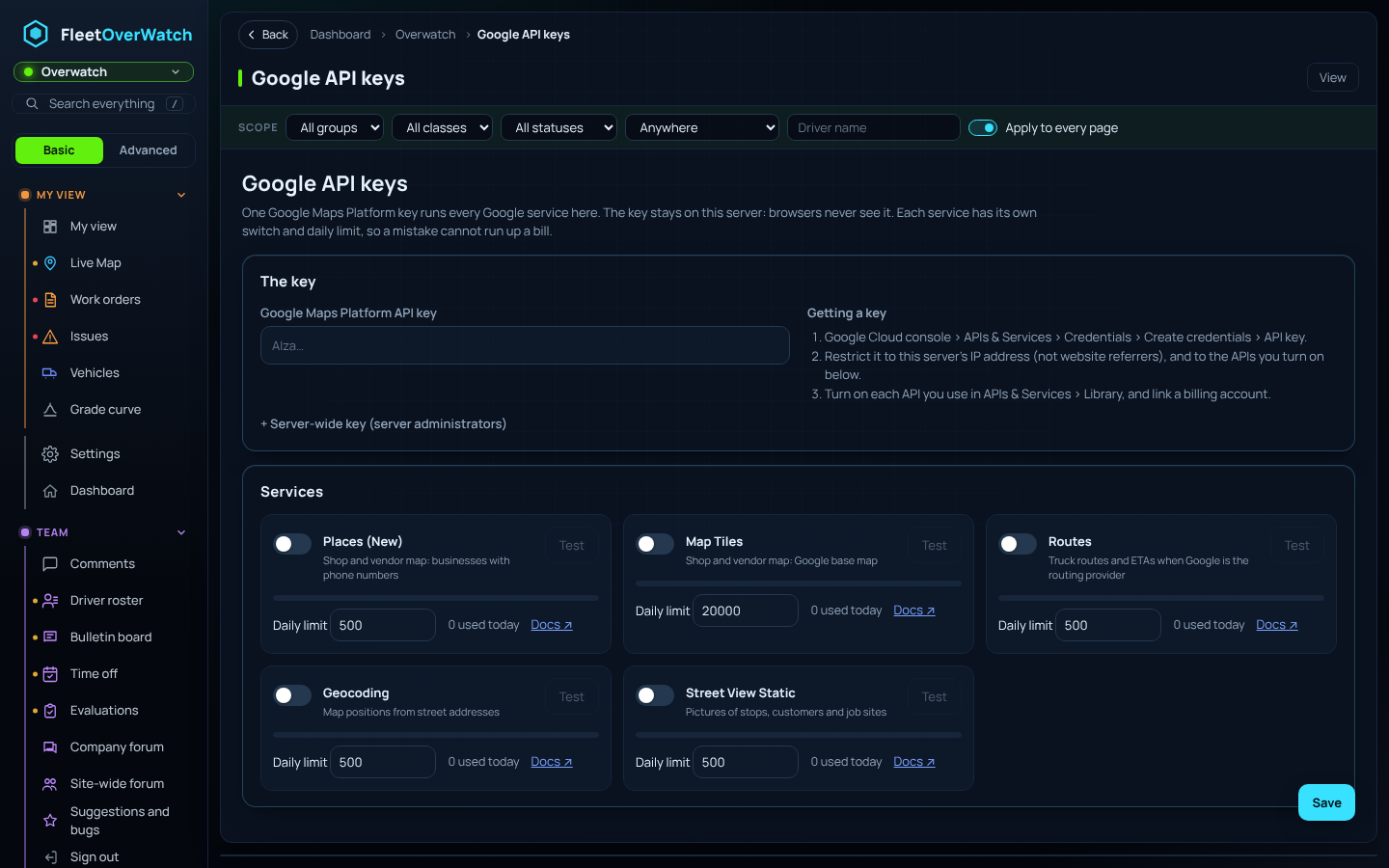
- In Google Cloud: APIs & Services › Credentials › Create credentials › API key. Restrict it to this server's IP address, not website referrers, and to the APIs you use.
- Turn on each API you need in APIs & Services › Library: Places API (New), Map Tiles API, Routes API, Geocoding API, Street View Static API. Link a billing account.
- Paste the key, switch on the services, set a daily limit for each, and press Test next to each one.
The meter under each service shows today's use. When the limit is reached, that service stops until tomorrow (UTC); the rest of the site keeps working with free sources.
Live data feeds #
Switch each feed on or off. Weather, radar, work zones and border waits need no key.
- EIA key (diesel prices): free at eia.gov/opendata.
- FMCSA WebKey (carrier checks): free at the FMCSA QCMobile developer site. Add your USDOT number to have it checked daily.
- State 511: add a row for each state with its free developer key. States on the common 511 platform fill in their address when you type the state code (AK, AZ, CT, GA, ID, LA, NV, NY, WI). Any other 511 system with the same interface works with its address.
- TPIMS truck parking: paste the availability feed and the site list your state publishes.
- Routing: OpenRouteService (free key, heavy-vehicle profile), HERE (truck routing) or Google Routes. Hazard distance is how far from the route an event counts (3 miles by default).
Feed addresses must start with https:// and reach the public internet; private and internal addresses are refused.
Connections #
- Traccar: your Traccar server's address and an API token (or user and password). Devices show on the maps and in trip replay.
- Motive: an API key from the Motive dashboard. Adds vehicle locations and driver safety events with video.
- Geotab: the server, database, and a service account's user and password.
- QuickBooks Online:
- Create an app at developer.intuit.com.
- Enter its client ID and secret, and add the redirect address shown on the page to the Intuit app.
- Press Connect QuickBooks and choose the company.
- Sync now sends approved vendor bills and issued invoices once, and brings back invoice payments.
- DAT and Truckstop: both give API access only to approved partners. Save the credentials they give you.
- Automatic checks: repair-estimate review (and how far above usual counts), repair forecast, telling drivers when a stop changes, and camera events.
Sign-in and SSO #
- Passkeys are on for everyone: My passkeys in each section's settings.
- Google: create an OAuth client (Web application) in Google Cloud. Add the redirect address shown on the page, then enter the client ID, the secret and your email domains.
- Microsoft: register an app in Microsoft Entra ID. Add the redirect address (Web), make a client secret, and enter the client ID, the secret, your tenant ID or domain, and your email domains.
Only people whose sign-in here has the same email address can use single sign-on; nobody new is created. People with two-step sign-in still enter their code afterwards. A passkey counts as both steps.
Something here out of date or unclear? Tell your administrator and mention “integrations-500” and version 5.0.5.